Built for the People Who Actually Manage the Network. Offline-Resilient. Native Desktop. Real AirCore Data.
AirCore Windows is a native Windows desktop Companion app by AirLive — managing devices, topology, and monitoring with faster power-user workflows, fully in sync with the AirCore cloud platform.What the desktop app covers
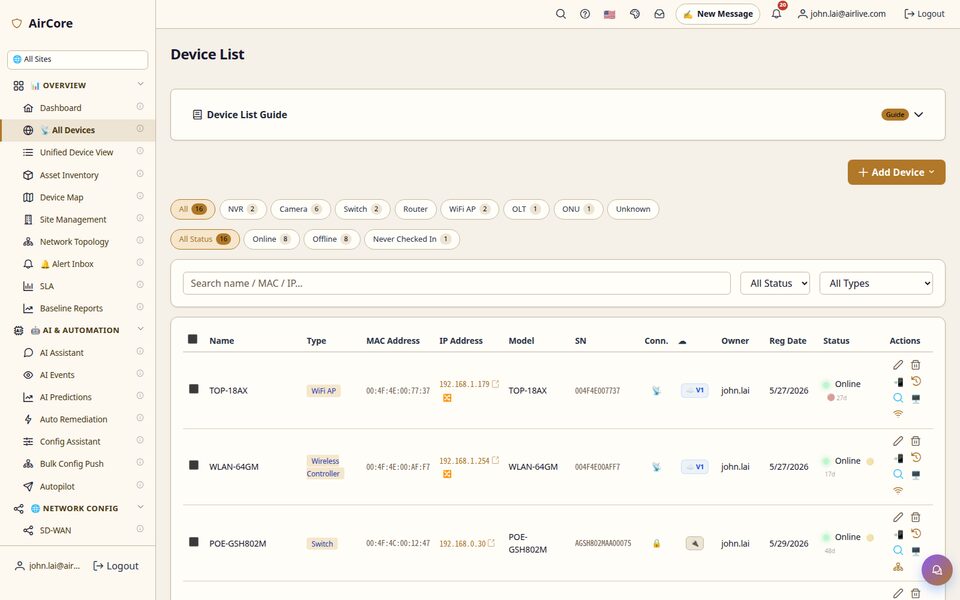
1Real-time dashboard, device list, and network topology visualization
2Multi-camera live wall, switch/AP/PON configuration, and Speed Test
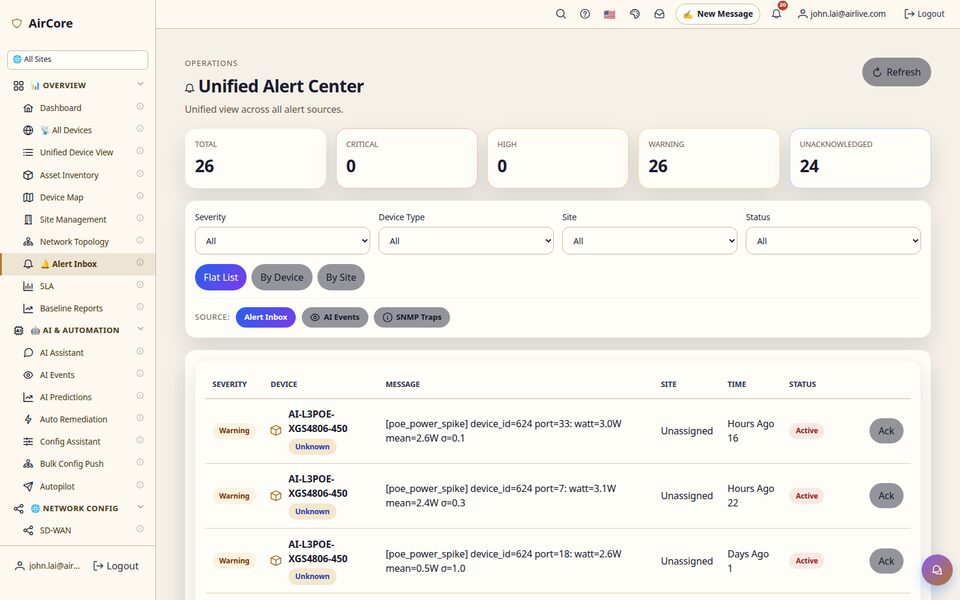
3Unified alert inbox pulling Alert Inbox, AI Events, and SNMP Traps
4Sign in with your existing AirCore account — no separate account needed
Built for
Field TechniciansNOC / MSP OperatorsOn-Site IT AdminsDaily Power Users
AirCore Windows now matches the web dashboard in near-1:1 visual and interaction parity — the real difference is what only a native desktop app can offer: instant tray access, native notifications, and keyboard-first workflows.
Free download · Signed installer (AirLive Technology Corporation) · Sign in with your AirCore account · Auto-updates via Velopack
Alpha Version — Still Under Development
v2.19.8
Real-Time Dashboard Device List Network Topology Camera Wall Switch Config AP Configuration Fiber (PON) + Speed Test Unified Alert Inbox Auto-Updates (Velopack) 12 Languages
Latest Updates
Stay informed with recent AirCore Windows developments
2.19.8 ships five real fixes and two localization follow-ups, plus the accumulated backlog of work already merged and reviewed on the shipping branch.
Fixed
- Clicking Dashboard or Site Management could switch the sidebar highlight but leave the con
2.19.7 ships two real-machine-reproduced fixes, plus the accumulated backlog of VN parity work that was already sitting on the shipping branch.
Fixed
- Clip Player could crash silently the first time it ever played a real clip with real detection da
2.19.6 adds video review and camera-wall tools, and corrects two places where the screen asserted more than the software had actually measured.
New
- Camera Wall: digital zoom on every live video surface - mouse wheel to zoom, drag a box to zoom int
Restores the bundled on-device AI detection model, which was missing from the 2.19.4 installer. Fresh 2.19.4 installations had object detection silently disabled; existing installations were unaffected.
NAS alert cards now show the actual usage/capacity values and the threshold instead of blank columns; a tenant with no measurable devices now shows a dash for SLA instead of 0%.
Fixed an issue where the automatic update process could misclassify the post-install step as a startup failure and trigger an unnecessary rollback.
2026-10-04
Why Desktop
What a Native App Gives You That a Browser Tab Can't
AirCore Windows matches the web dashboard in near-1:1 visual and operational parity — the real
difference is what only a native desktop app can offer for people running the platform all day.
Offline-friendly quick access — installed locally, lives in the system tray, instant open
Native Windows integration — native windows, system notifications, no browser tab pretending to be an app
Power-user workflows — global search, keyboard-first navigation, dense multi-tab layout
Always-on alerts — runs in the background so device-down notifications reach you immediately
Multi-language
The Same 12 Languages as the AirCore Web Console
AirCore Windows ships with the same 12 languages as the AirCore cloud dashboard, so
cross-region teams keep working in their own language when they move to the desktop.
12 languages: English · 繁體中文 · Español · Tiếng Việt · 日本語 · Deutsch · Français · Čeština · Bahasa Melayu · العربية · Nederlands · Português
Sign in with your existing AirCore cloud account — no separate account needed
Same language choice, same login on both — desktop strings cover the Companion's own screens, a focused subset of the full web console
How It Works
One Login. Native App. Real AirCore Data.
AirCore Windows is a native client on top of the same AirCore cloud platform that powers the web dashboard — not a separate product with separate data.
🖥️
Native Desktop App
Installed locally on Windows 10/11, lives in the system tray, opens instantly — no browser tab, no re-login every time.
Native windows & system notifications
Global search, keyboard-first navigation
Dense multi-tab layout for daily operators
Auto-updates via Velopack after install
🔄
AirCore Cloud Sync
The desktop app talks to the same AirCore cloud backend as the web dashboard — the same devices, alerts, and topology, kept in sync.
Sign in with your existing AirCore account
Same data as aircore.airlive.com, no duplication
Near-1:1 visual and interaction parity with the web
🔌
Real Managed Hardware
Manages the same AirLive device line as the web dashboard — switches, APs, OLTs, NVRs, and more.
WiFi access points
PoE & non-PoE switches
GPON & XGSPON OLT (fiber)
NVR & IP cameras
Core Capabilities
Every Screen, Captured from a Real Account
These screens are captured from a real AirCore account in production — showing the actual scope of what the desktop app covers, not mockups.
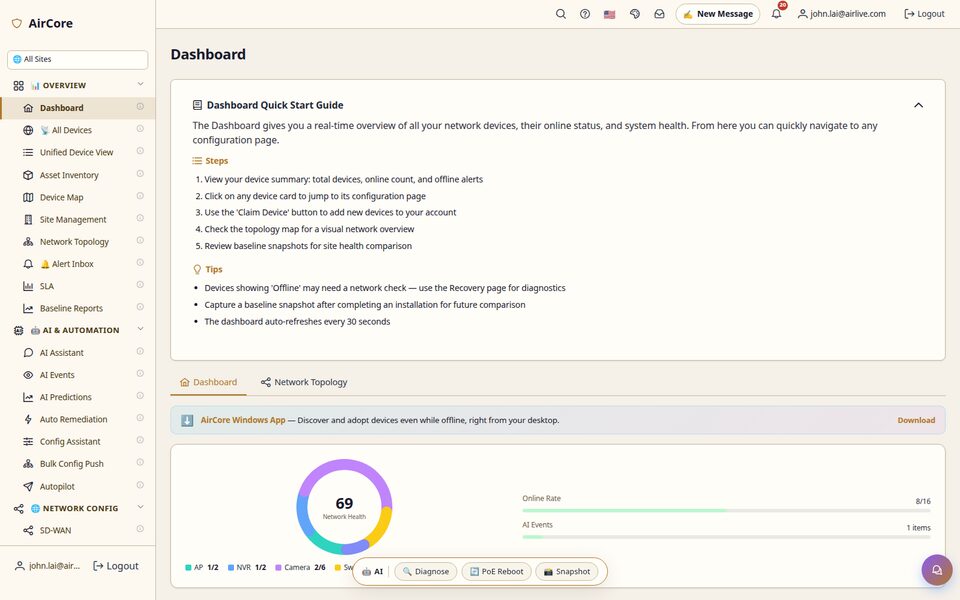
Real-Time Dashboard
Network health, online rate, and AI events at a glance
Overview
Device List Management
Filter by type and status across APs, switches, cameras; scans every local network interface (not just the first) with batch multi-select adopt for onboarding multiple discovered devices at once
Devices
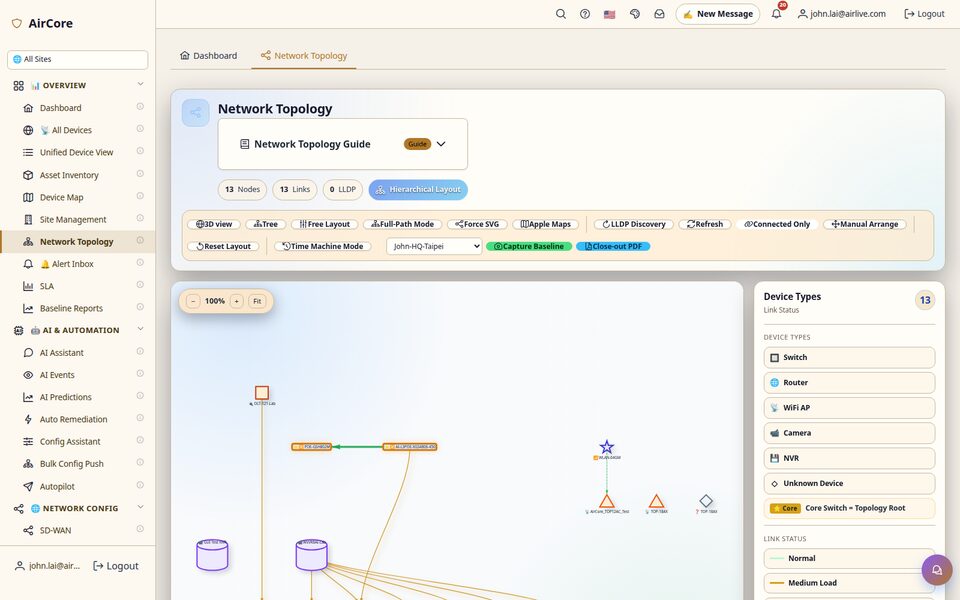
Real-Time Network Topology
Visualized connections and link status, hierarchical layout
Topology
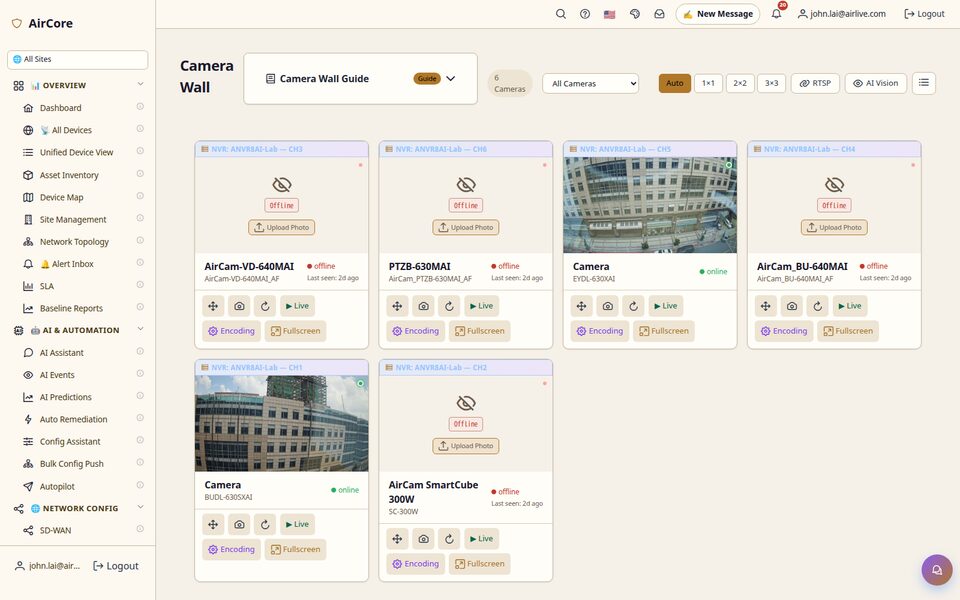
Camera Wall
Multi-camera live wall over WebRTC/WHEP (no same-LAN required), NVR per-channel AI/alarm integration, ONVIF auto-classification
Cameras
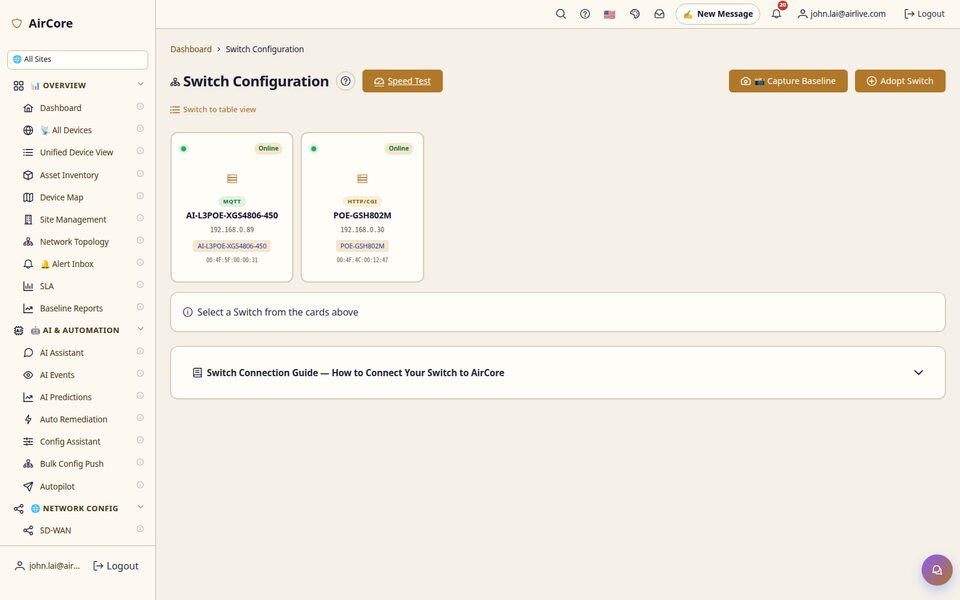
Switch Configuration & Speed Test
Manage switch configuration incl. VLAN/Ports/PoE overview, with a built-in Speed Test
Switches
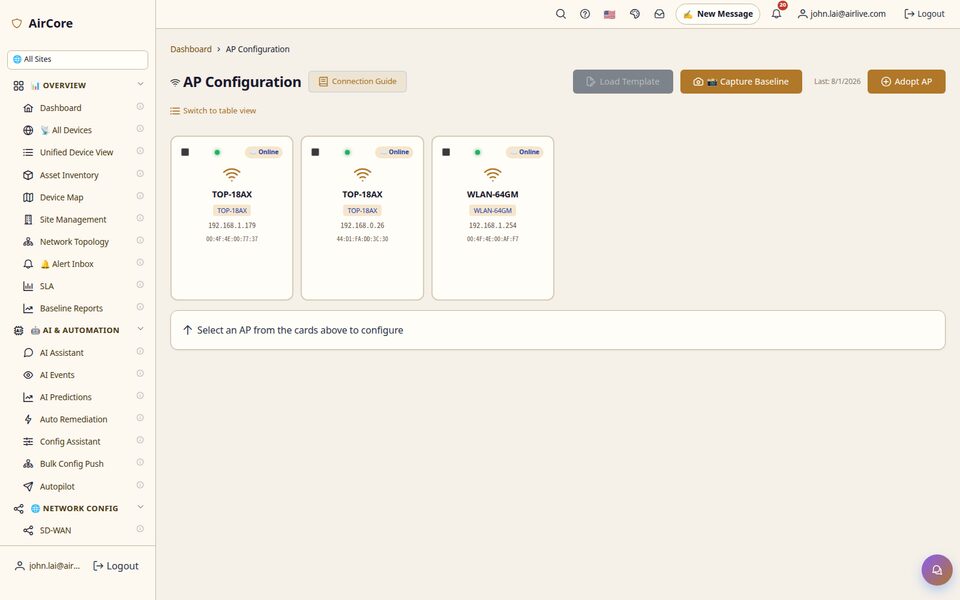
AP Configuration
Full categorized AP config (Wireless/Network/Security/Services/System/Templates) matching the web dashboard, with template loading
Wireless
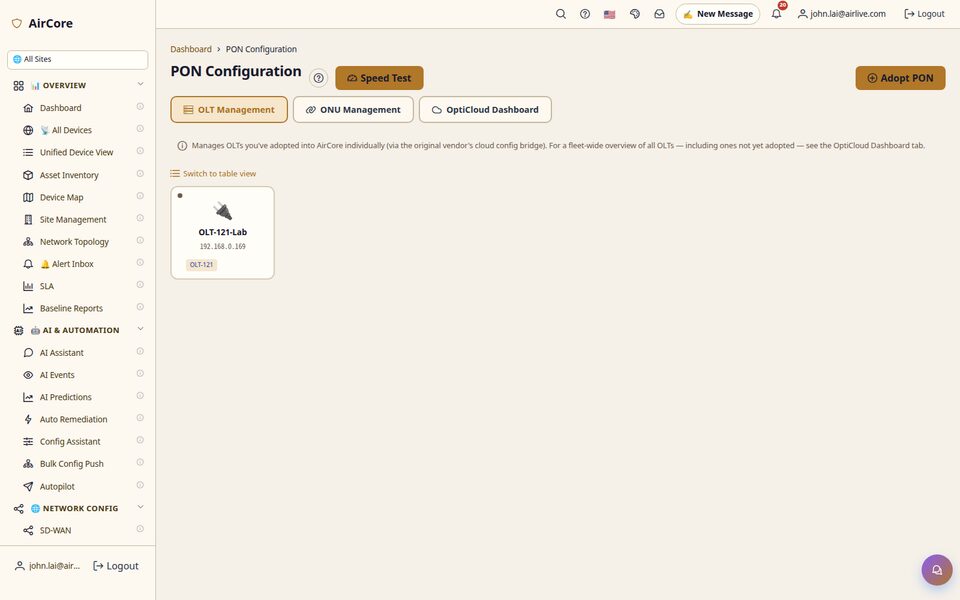
Fiber (PON) Management & Speed Test
OLT/ONU management with built-in fiber-line Speed Test
Fiber
Unified Alert Inbox
Alert Inbox, AI Events, and SNMP Traps in one view
Alerts
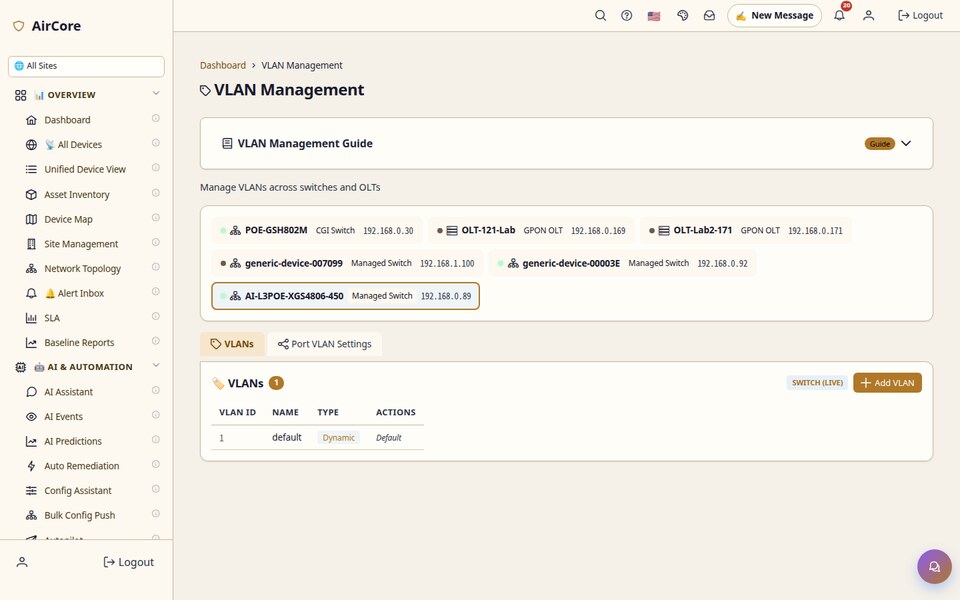
VLAN Management
Create and view VLANs across switches and OLTs, with per-port assignment to keep network segmentation consistent across large sites
Switches
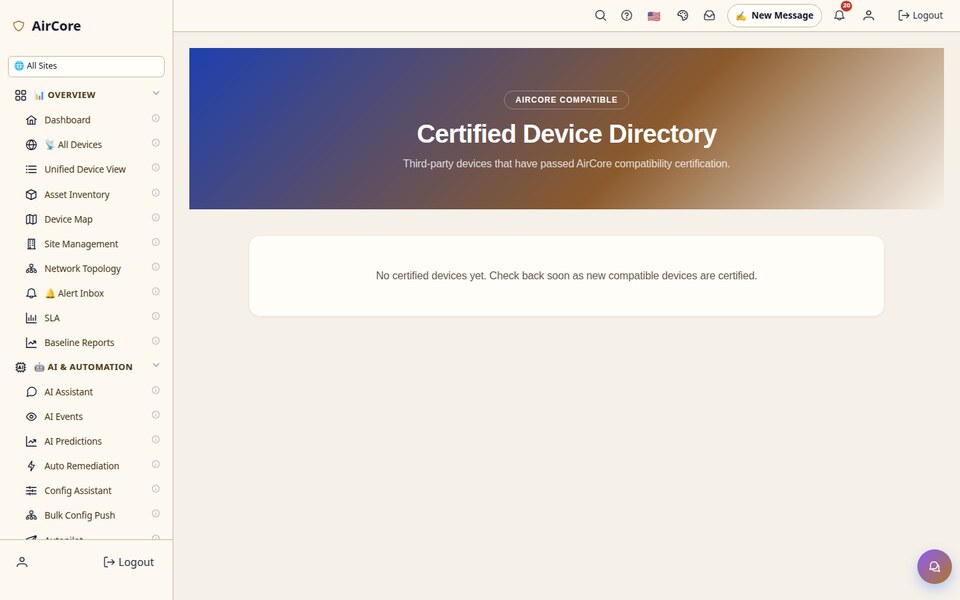
Certified Device Directory
Browse third-party devices that have passed AirCore compatibility certification before you adopt — buy with confidence
Devices
Deep Dive
Built for Operators Living in the Platform All Day
Eight capabilities that show up the most in day-to-day desktop use.
🖥️
Real-Time Dashboard
Network health and online rate at a glance
AI events surfaced without digging through logs
Whole estate visible in one native window
🗺️
Real-Time Network Topology
Visualized device connections and link status
Hierarchical layout for multi-site networks
Baseline snapshots to compare state over time
📹
Camera Wall
Up to 8×8 (64-camera) split layouts with 128-camera paging
Auto-Tour cycles wall pages hands-free; save and reload named wall arrangements
Per-tile health badges with automatic reconnect — failed feeds heal themselves
🧠
On-Device AI Detection
Companion analyzes camera feeds locally and detects people, vehicles, and other common objects
The AI Events view populates as detections occur
Detection runs on your own machine — no cloud video upload required
🎞️
Recording Timeline & Clip Export
Play back recorded footage straight from the NVR's on-board archive on a timeline
Export a clip URL in one click
Reachable from the Recordings shortcut
🔌
Switch Configuration & Speed Test
Manage switch configuration natively
Built-in Speed Test for real link performance
No separate CLI session required
🌐
Fiber (PON) Management & Speed Test
Manage OLT/ONU fiber devices
Verify fiber line quality directly from the tab
Same Speed Test engine as the switch tab
🔔
Unified Alert Inbox
Alert Inbox, AI Events, and SNMP Trap sources unified
Groupable by device or by site
Background tray alerts — no browser tab needed
Complete Feature Set
More Than a Dashboard — a Full Management Console
🖥️ Unified Dashboard
📋 Device List
🗺️ Network Topology
📹 Camera Wall
🔌 Switch Configuration
📡 AP Configuration
🌐 PON / OLT Management
⚡ Speed Test
🚨 Alert Inbox
📡 AI Events
🤖 AI Assistant
⚡ AutoPilot
🔧 Self-Healing (Beta)
⚙️ M2M Device Config
🗄️ NAS Operations
🧭 Router / Firewall
🔒 Access Control
🌡️ Environmental Sensors
🔋 Power Management
🖧 Infra Device Management
💾 Firmware Management
📋 Site Templates
📊 Baseline Reports
📈 SLA Dashboard
🔐 RBAC Multi-Tenant
🌍 Connectivity Settings
❓ Help Centre
🔔 Notification Center
💳 Billing
👥 Reseller Portal
📡 Data Meter
🗓️ Maintenance Scheduler
🏷️ VLAN Management
✅ Certified Device Directory
🪟 Window Layout Memory
📍 Device Map Coordinate Editing
🗺️ Google Maps & Street View
📶 Controller Zero-Touch Adopt
🎥 NVR Zero-Touch Adopt
📷 Legacy Camera Zero-Touch Adopt
🎦 AI Camera Zero-Touch Adopt
🛠 Work Orders
🛡️ Admin Panel
🔔 Alert Bell Dropdown & Acknowledge
💡 AI Suggestions
🔮 AI Predictions
🧰 Remediation Runbooks
🧠 On-Device AI Detection
AutoPilot
AutoPilot Status, Right on Your Desktop
AirCore's AutoPilot continuously monitors every device in the cloud. The desktop app's AutoPilot tab
surfaces that same self-healing status natively — no browser tab needed to see what just got fixed.
Screen Tour
A Closer Look at Real Workflows
The same real screenshots, framed around the workflows they support day to day.
Fiber Line Troubleshooting
Open the PON tab, check OLT/ONU status, run Speed Test — verify a fiber line's real performance without leaving the app.
Multi-Camera Monitoring
Switch the Camera Wall up to an 8×8 layout and keep every feed visible in one native window, tray-resident — offline tiles label themselves and reconnect on their own.
Multi-Site Topology Review
Drill into the hierarchical topology view to trace a link-down event back to the exact port that caused it.
Unified Alert Triage
Group the unified Alert Inbox by site to triage AI Events and SNMP Traps together, not as separate tools.
Who Uses AirCore WindowsUpdated 2026-10-15
Built for the People Living in AirCore All Day
The desktop app isn't a replacement for the web dashboard — it's for the people who use AirCore most.
🛠️
Field Technicians
Installed locally, so it opens instantly on-site without waiting on a browser or a stable connection to load a full page.
Instant tray access, no re-login on every visit
Device list & topology available the moment it opens
Speed Test built into the switch and PON tabs
🖥️
NOC / MSP Operators
Dense, multi-tab layout and keyboard-first navigation built for operators who live in the platform all shift.
Global search across devices and tabs
Unified Alert Inbox grouped by device or site
Native notifications, no missed alerts from a backgrounded tab
🏢
On-Site IT Admins
Manages the same real devices as the web dashboard, from a native app that feels like part of Windows, not a browser tab.
Switch, AP, and PON configuration in one place
Camera Wall for on-site surveillance checks
Sign in with the same AirCore account used on the web
🎥
Surveillance Operators
The Camera Wall's live multi-camera layouts and RTSP support make it a real day-to-day monitoring tool, not an afterthought.
1×1 up to 8×8 (64-camera) live wall layouts
Auto-Tour, saved wall arrangements, per-tile health badges
Runs alongside other tabs, not a separate NVR client
🌐
Fiber / ISP Technicians
PON management and built-in Speed Test mean fiber-line quality checks happen in the same app used for everything else.
OLT/ONU device management
Speed Test directly from the PON tab
No separate CLI tooling required
🔔
Anyone Who Needs to Not Miss an Alert
Runs in the background so device-down and alert notifications reach you immediately — no browser tab has to stay open.


.png)